

Is your brand—personal or professional—on Pinterest?
The opportunities to expand your reach and meet your audience are many on Pinterest, and they come in many unique ways. Though falling under the umbrella of social media marketing, Pinterest has its own special notes and best practices that help make it an enjoyable, exciting place to test, iterate, and add value to those on the network.
I’m pretty new to Pinterest marketing strategies, and I am keen to keep improving what I pin and share so that my followers find things as valuable and helpful as can be.
I’m grateful for a large amount of Pinterest marketing tips out there. I aimed to try them all.
Here’s what worked for my Pinterest account.
All the Pinterest Marketing Tips I Tried and Tested …
… and which ones worked best!
I’m happy to share the full list and results from my Pinterest experiments. I’ve added lots more detail to each category below. Here’s a quick look at the strategies that worked best for my Pinterest Business profile.
1. Pin more often, and space out your pins
Perhaps the best change I’ve made to my Pinterest engagement is to pin it more often.
I’ve gone from pinning once or twice a day to pinning 7 times per day.
As a result, I’ve seen 150 percent more engagement on Pinterest.
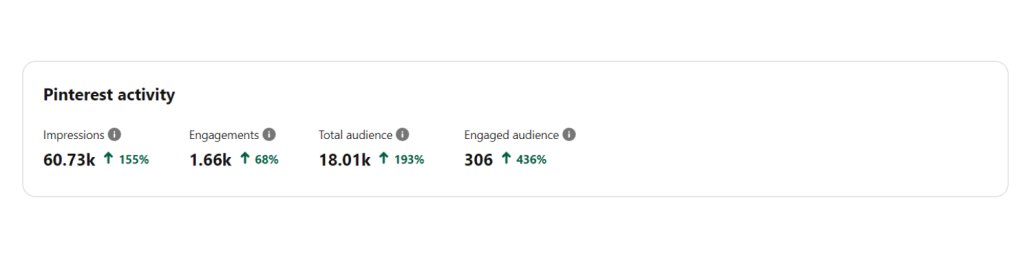
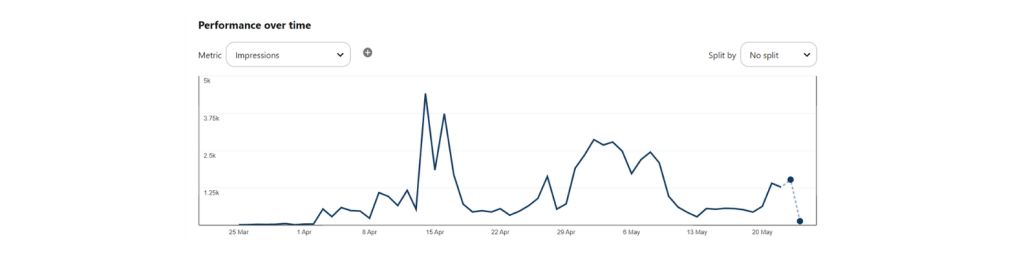
A few things to consider with a strategy of pinning more:
- Scheduling ahead of time has made things infinitely easier for me. I can go through batches of finding and discovering great content to share with my Pinterest friends, and I can place it into a schedule so that it’s spaced out over a few days. This helps with a consistent volume of Pinterest content to share.
- Spacing out your pins is hugely helpful for your audience. Instead of folks seeing 10 pins all in a row from us about social media tips, these pins can arrive at Pinterest in a queued schedule, over time, to avoid any bursts of content.

2. Create the right-sized images
The best aspect ratio for Pinterest images is 2:3 or 1:3.5, with a minimum width of 600 pixels.
What is aspect ratio? It’s how the width and the height of an image relate to one another.
For instance:
A 2:3 aspect ratio could be
- 600 pixels wide by 900 pixels tall
- 800 pixels wide by 1,200 pixels tall
The below image has a 2:3 aspect ratio:
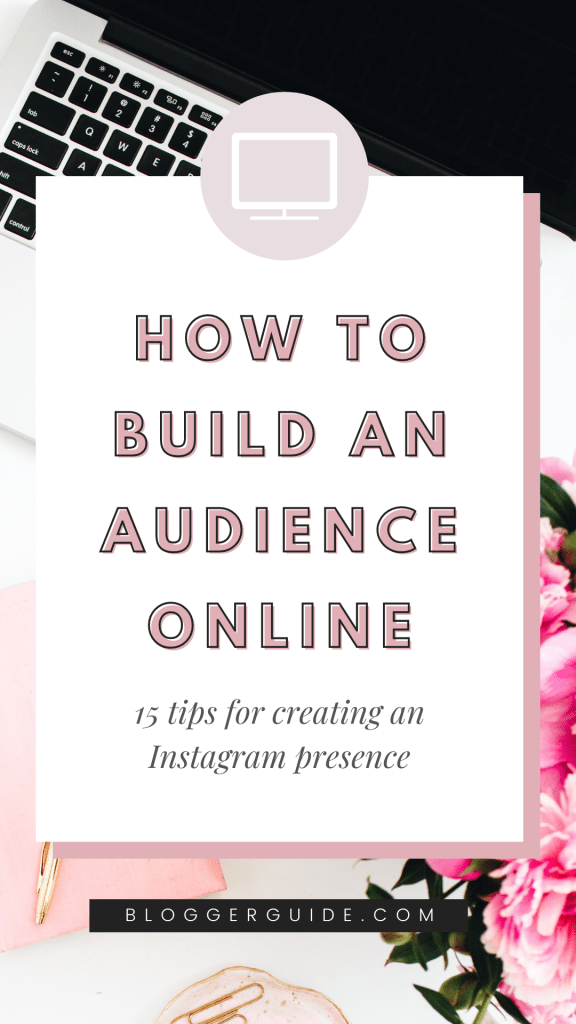
So how do you create these Pinterest-perfect images?
You can create the image from scratch, building a new image with specific dimensions and aspect ratios in PhotoShop or Gimp.
If you prefer an online tool, you can grab something simple like Canva, which comes with premade templates for Pinterest that are 735 pixels wide by 1,102 pixels tall (a 2:3 aspect ratio).
With this Pinterest tip in mind, I aimed to create at least one Pinterest-optimized image for each of my new blog posts (I used Canva for this). The results: I saw a couple of images spread quite far!
Many of the other images I made didn’t quite reach the top of our analytics for the past 30 days. It’s perhaps notable that the one that did—How to start a blog—was the most recent one I made. Hopefully, this means my account is improving!
3. Write better descriptions – keyword-rich, detailed
5 keys to what it’s found to be most valuable in writing up the descriptions of your pins.
- Helpful details
- Keywords
- Okay to be a couple sentences long
- Positive sentiment
- Give the reader something to do. If there’s an action they can take, share the next steps and add a link to somewhere useful.

Keywords help your audience to find you on the market. At least use 3-4 (more is good) keywords in the description. Also, write friendly Keywords on the title and Board for better exposure.
4. Include Links in Pin and Board Descriptions
This is a simple but effective trick. Adding a link to your pin and/or board descriptions can increase clicks to your site because users can click on the pin to actually travel to your site. It can also show users where they’re going without clicking on the pin to view it or leaving Pinterest.
You should keep the link as short as possible.
As well as adding links to your descriptions on pins and boards, make sure you always include a link to your website on your main profile page. It’s important to remember because this can send more traffic to your main site.
5. Schedule Pins
While you want to pin often, you also want those pins to be spaced out throughout the day. Trying to post multiple times a day, every day, can be exhausting unless you have a scheduling tool.
Unfortunately, Pinterest doesn’t have any features that allow scheduling in advance (at least not yet). Fortunately, there are several third-party tools available to help you.
Scheduling your pins can keep your content on track and consistent.
6. Explore Pinterest’s Analytics
The analytics and data we have about our content marketing or social media marketing efforts is important. You can find out who your audience is, who you’re missing, and what content is performing well (and what isn’t). Having this data can help improve your results over time.
Pinterest has an analytics platform available for those with business profiles, which lets you see information about pin performance and general audience.
7. Put Keywords Everywhere
Keywords are just as important on Pinterest as they are on Google. When people use the search engine, keywords determine what pops up.
Since users can search for pins, boards, and pinners by keywords, you need to put keywords everywhere you can. Every possible description that’s open to you should have at least one keyword on it. Include keywords in the descriptions on your pins, your boards, and even your profile.
8. Research Related Keywords
Knowing what keywords you want to use in your regular pins and boards can be difficult, but promoted pins can give you some insight. When you add a keyword to your promoted pins (and again, you never have to run the campaign if you don’t want to), you’ll see a list of relevant related keywords that you can choose from.
Pinterest also automatically provides a few keywords to choose from before you even search, based on the pin you’re promoting.
Conclusion
There’s a variety of tips and techniques that you can use to get better results when marketing on Pinterest. Whether you’re looking to optimize your pins’ images so they stand out in searches or focus on using Pinterest’s features to connect and engage with your audience, these 8 tips for Pinterest marketing will boost your success and help you get the results you’re looking for.
What do you think? Which tips have you used in your Pinterest marketing efforts? What’s worked for you? Share your thoughts, knowledge, and experience in the comments below!


 Empowered Woman | Entrepreneurs
Leave a comment